Mac app · smart trainer in ERG mode
Your workout in the notch.
Your show in full screen.
SweetWatt runs your smart trainer and shows the essentials around the MacBook's camera: the power to hold, the time left, the next change ten seconds before it comes. The rest of the screen is your video.
5 free workouts, every feature unlocked. No account, no subscription.
- macOS 26+
- Bluetooth FTMS
- .zwo import
- FIT files
- intervals.icu
— You think he saw us?
During the ride
Just what you need, just when you need it
The island lives in the black band at the top of the screen and only grows when it has something to say. Nothing covers the picture. These are the app's own renders, to scale.
-
Ten seconds ahead
You know what's coming
The next power, its zone, the cadence asked for and the countdown. You settle in, you breathe, and no block ever takes you by surprise.

-
Cadence
When your legs slow down
Below the target cadence, the island shows you the one to get back to. And if you really bog down, the target eases off while you spin back up, then climbs back gently: no death spiral.

-
Under the pointer
Controls one hover away
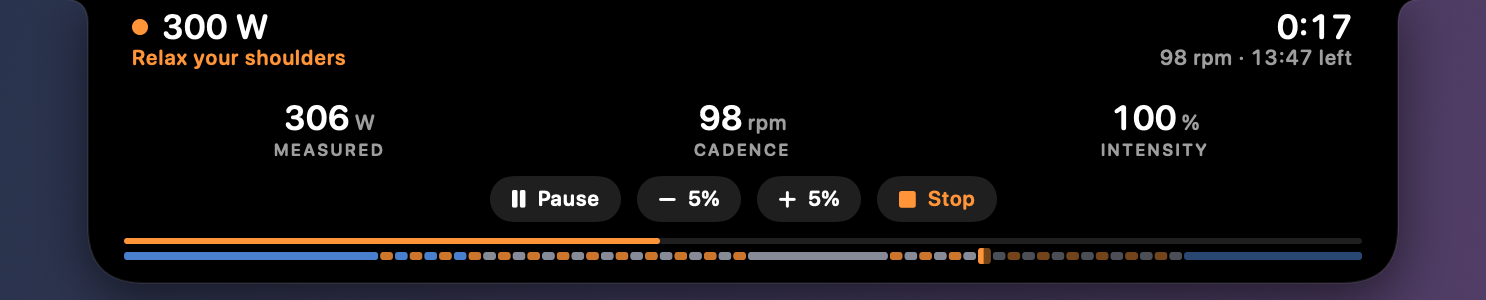
Move the mouse over the island and it opens: measured power, cadence, heart rate if your trainer relays it, intensity, and Pause, −5%, +5%, Stop. It closes when you move away, without leaving your video.
-
Pause
You stop, it waits
Five seconds without pedaling and the workout pauses, the clock stops. It picks up again on your first pedal stroke.

-
At the end
The summary, and nothing gets lost
Normalized power, IF, TSS, and an FTP estimate after a test. Ten seconds, then the island fades and hands your show back. The workout stays on your Mac, in the history: look at it again whenever you like, with its FIT file to send to intervals.icu in one click, or share on Strava, Garmin Connect and elsewhere.

What it does
- It sets the power on your trainer, interval by interval, in ERG mode over Bluetooth FTMS. Ramps climb second by second.
- It reads what the trainer reports: power, cadence, heart rate if it relays it.
- 14 workouts included, from recovery to an FTP test, plus your own in .zwo format.
- A FIT file for every workout, to send wherever you like. To intervals.icu in one click, with your API key.
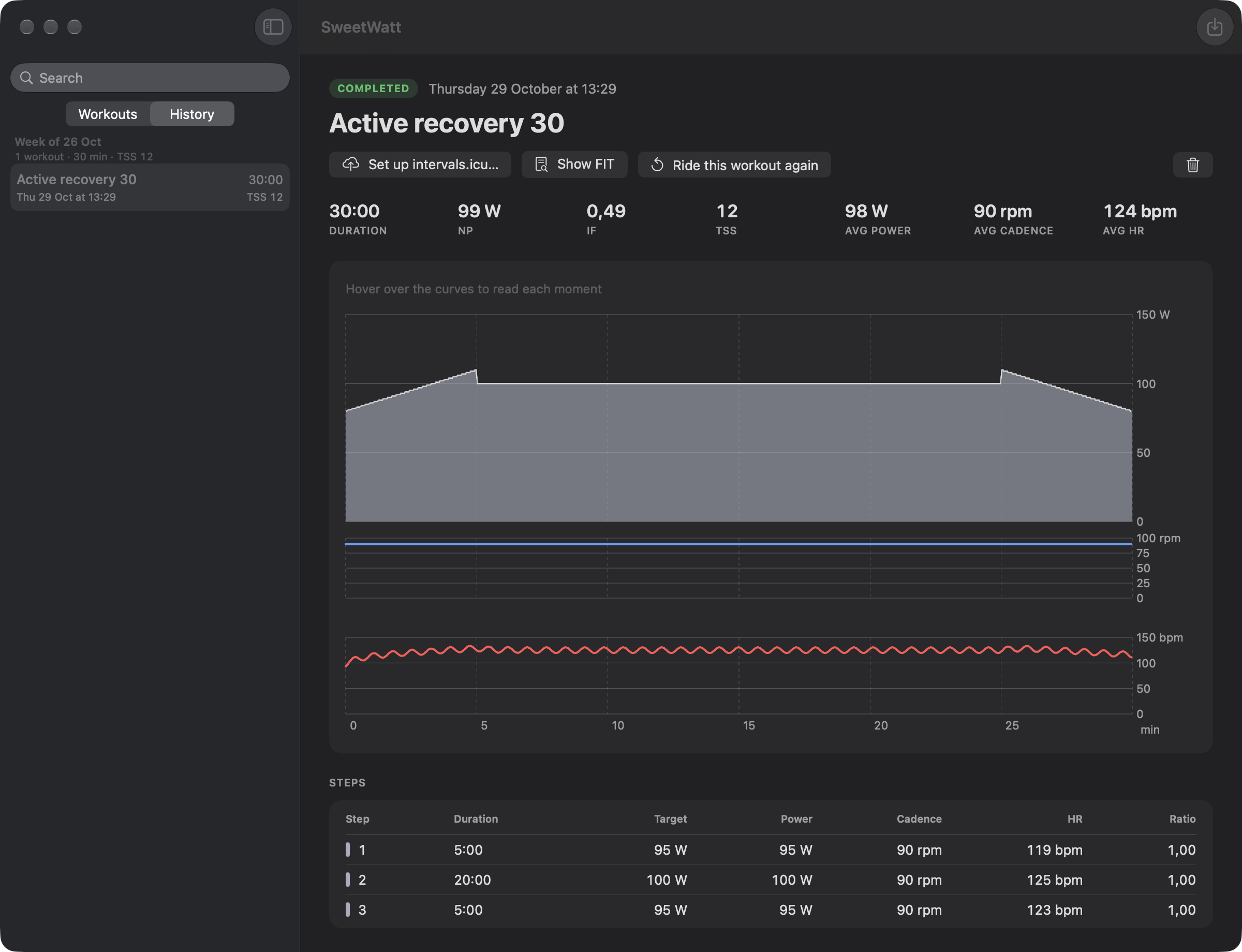
- A history with power and cadence charts, and a step-by-step summary.
What it doesn't do
- No virtual world, no avatar, no racing, no leaderboard.
- No account, no server. Your data stays on your Mac.
- No subscription. One license, paid once.
- No training plan. You pick the workout, it runs it.
- No direct Strava sync for now. The FIT file uploads there in two clicks.
The window
Three settings and you're off
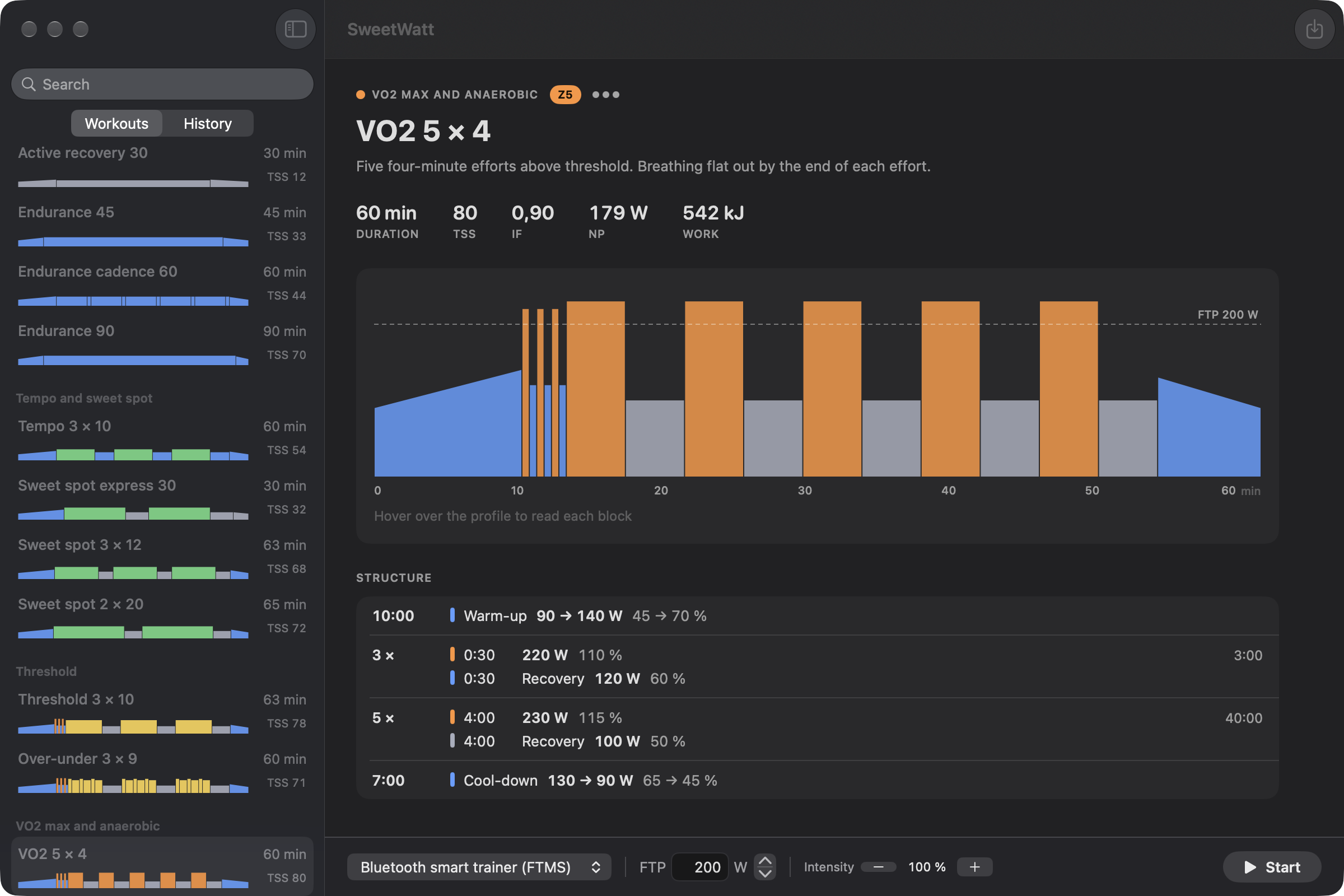
Your FTP, your trainer, your workout. Everything else happens in the notch.
- Every workout with its profile in zone colors, its duration and its TSS. The 14 included ones, sorted by family, and the .zwo files you import.
- The workout sheet spells out each block, in watts at your FTP, before you start. Intensity goes from 50 to 150% in steps of 5.
- History by week, with the training load total, and the details right there: charts, step summary, FIT, upload to intervals.icu.
- A ramp FTP test that suggests your new value at the end.
After
Every workout, in detail
The workout you just finished opens right there in the window: power over the target area, cadence, heart rate when there is one, one row per step with the power-to-target ratio. A FIT file per workout, one button to send it to intervals.icu, another to ride it again.
Included
14 workouts, written for the app
Thirteen workouts from recovery to 40/20, 30 to 90 minutes long, plus a ramp FTP test. Each one tells you in two sentences what you're going to feel. Add your own as .zwo files.
- Z1Active recovery 3030 min
- Z2Endurance 4545 min
- Z2Endurance cadence 6060 min
- Z2Endurance 9090 min
- Z3Tempo 3 × 1060 min
- SSSweet spot express 3030 min
- SSSweet spot 3 × 1263 min
- SSSweet spot 2 × 2065 min
- Z4Threshold 3 × 1063 min
- Z4Over-under 3 × 960 min
- Z5VO2 5 × 460 min
- Z530/3045 min
- Z540/2050 min
- FTPRamp test≈ 25 min
Trial
Try before you pay
-
1. Download
No account, no credit card. Pick a workout and start pedaling.
-
2. Ride 5 real workouts
Every feature unlocked, no time limit. A workout only counts from 10 minutes on: a connection test costs you nothing.
-
3. Keep it, or don't
If you like it: one license, paid once, €20 at launch. If not, your workouts and their FIT files stay yours.
Price
One license, paid once
€20 once
For the whole of version 1, updates included. That's the launch price, for the first 50 licenses only: the price goes up afterwards.
Before you buy, 5 full workouts for free: time to check that your smart trainer and your Mac get along.
- Every feature, from the trial on
- All 1.x updates
- No subscription, no account
- Secure payment, invoice by email
Compatibility
What you need
-
A Mac on macOS 26 or later
macOS 27 included. On a MacBook with a notch, the island wraps around the camera. On any other screen, it's a small pill at the top, in the same place.
-
A Bluetooth FTMS smart trainer
It's the standard for connected trainers, and most recent models speak it. Check yours just below. No ANT+.
-
Nothing else. Except your legs.
Power and cadence come from the trainer, no separate sensor needed. Heart rate shows up if the trainer relays it.
Is your trainer compatible?
Type its brand or model and we'll tell you what its spec sheet says.
For example:
Based on the makers' spec sheets. The 5 trial workouts confirm it at home, before you pay.
All known models
- Wahoo KICKR v5 and v6 KICKR 2018 updated KICKR CORE updated KICKR CORE 2 KICKR MOVE KICKR SNAP to check KICKR BIKE to check
- Tacx NEO 2T Flux S updated Flux 2 updated NEO 3M to check NEO and NEO 2 to check Flow, Vortex, Bushido, Genius to check
- Elite Direto XR and XR-T Suito and Suito-T Justo Tuo Zumo to check
- Van Rysel D100 D500
- Zwift Zwift Hub
- Saris H3 H4
- Wattbike Atom
- JetBlack Volt and Volt V2
- To check
- Their spec sheet doesn't clearly say FTMS. The 5 trial workouts will tell.
- Not compatible
- Trainers that only speak ANT+ or a proprietary protocol, rollers and trainers without controlled resistance, and bikes tied to a closed platform.
FAQ
Your questions
Do I need a MacBook with a notch?
No. On a MacBook with a notch, the island wraps around the camera, in the band that is already black in full screen. On any other screen, it becomes a small pill at the top, in the same place. You need macOS 26 or later.
Is the app in English?
Yes. SweetWatt follows your Mac's language: English, French, Spanish, Italian, Portuguese or German, and English for any other. The 14 included workouts are translated too.
Which smart trainers are compatible?
Any smart trainer that speaks Bluetooth FTMS, the standard for connected trainers: Wahoo KICKR and KICKR CORE, Tacx NEO 2T and Flux, Elite Direto and Suito, Zwift Hub, Van Rysel D100 and D500, among others. The full list is in the Compatibility section. SweetWatt reads power and cadence from the trainer itself, no separate sensor needed. ANT+ and proprietary protocols are not supported.
Can I use my own workouts?
Yes, in .zwo format, the one used by Zwift and by most tools that export structured workouts. Import the file into the library and it sits next to the 14 included workouts. A broken file gets a warning, never a crash.
Where does my data go?
To your Mac, one folder per workout: second-by-second samples, a summary and a FIT file. No account, no server. If you ask it to, the app sends the workout to intervals.icu with your API key, and the FIT file uploads to Strava or Garmin Connect from their websites.
What happens if I stop pedaling?
After five seconds without cadence, the workout pauses; it picks up again on your first pedal stroke. Same if Bluetooth drops: pause, then an automatic restart when the trainer comes back, with the right target. And if your cadence bogs down below 50 rpm, the target eases off for a moment so you can spin back up instead of grinding to a halt.
How do I change the intensity during a workout?
Move the mouse over the island: it opens on what the trainer measures and four buttons, Pause, minus 5%, plus 5% and Stop. Intensity goes from 50 to 150% in steps of 5. It closes when the pointer moves away, without leaving your video.
How much does it cost?
The trial is free for 5 full workouts, every feature unlocked, no time limit. After that, one license for the whole of version 1: €20 for the first 50 licenses, more afterwards. One secure payment, with the invoice by email. Your license is activated online once, then works even offline. No subscription.
What happens after the 5 workouts?
Without a license, only starting a new workout is blocked. Your history, your FIT files and the upload to intervals.icu stay open, and a workout in progress is never cut off. A license key unlocks the rest right away, no reinstall.
Why not on the Mac App Store?
To keep the 5-workout trial and a simple license. The app is signed with a Developer ID certificate and notarized by Apple, updates itself, and runs in the macOS sandbox with three permissions: Bluetooth, outgoing connections, and the files you choose.
Who makes it?
Gaëtan, a developer and cyclist, built it for winter workouts in front of a show. One person, one product, and an email that lands with someone who rides too.
Start the episode. The trainer handles the watts.
5 free workouts, then €20 once for the first 50. A Mac, a Bluetooth smart trainer and your legs.
Try 5 free workouts